

In today’s digital marketing agency, stunning visuals alone aren’t enough. If your images slow down your site or fail to rank, they work against you. At Paper Cut Collective, we blend design excellence with technical finesse ensuring your visuals look great and perform brilliantly.
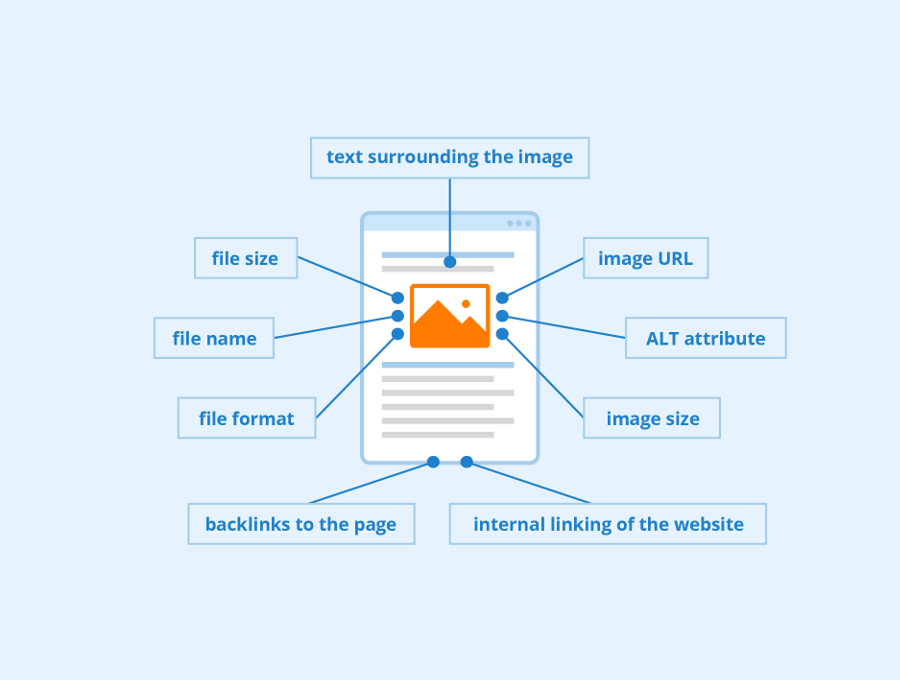
Here’s our refined, step-by-step guide to image SEO company perfect for brands that want beauty without compromise:
1. Benchmark Your Site Speed
Start with a speed audit using tools like Google PageSpeed Insights to assess your current load times and Core Web Vitals. This gives you a clear performance baseline.
2. Choose the Right File Format
-
JPEG: the go-to for photos (smaller file with good quality)
-
PNG: ideal for icons or transparent images
-
WebP/AVIF: next-gen formats that offer advanced compression cutting load times by ~15–21% in tests
3. Resize Before Uploading
Upload only the dimensions you need. Avoid huge camera files on the web crop or scale using tools like Photopea.
4. Compress Images Smartly
Use a balance of lossy (saves more space with slight quality loss) and lossless compression as needed. Tools like TinyPNG, ImageOptim, or ShortPixel work well.
5. Automate with Plugins
Simplify the process by using WordPress plugins like Smush or ShortPixel to handle resizing, format conversion, and compression on-the-fly.
6. Use Blur-Up Placeholders & Lazy Loading
Improve perceived speed with a low-quality “blur-up” image that transitions into the full version, and implement lazy loading so images only load when scrolled into view.
7. Optimize Filenames, Alt Text & Titles
-
Filenames: use descriptive, hyphen-separated names that match context (e.g., eco-friendly-packaging.jpg)
-
Alt text: concise, contextual, and accessible include relevant keywords naturally
-
Title tags: helpful for SEO and UX, especially in WordPress
8. Declare Width & Height to Prevent Layout Shifts
Improves Core Web Vitals (e.g., Largest Contentful Paint) by reserving space while images load.
9. Use Responsive Images (srcset / <picture>)
Serve device-appropriate versions to optimize loading across screens built-in in WordPress since version 4.4.
10. Add Structured Data & XML Image Sitemaps
-
Use schema or sitemaps to help search engines find and index your images.
-
Plugins like Yoast automate this alongside metadata and Open Graph/YT/X tags.
11. Deliver via CDN
Use image CDNs like Cloudinary, Sirv, or Cloudflare for faster global delivery and on-the-fly optimisation.
Why This Matters for Your Brand
Optimized images aren’t just a technical checkbox they:
-
Boost SEO through image search visibility
-
Improve UX with faster loads and stable layouts
-
Enhance conversions by making visuals crisp and trustworthy
Search engines reward pages that balance great visuals with high performance.
Paper Cut Collective’s Creative-SEO Process
-
Site audit + PageSpeed benchmark
-
Ideal format & responsive sizing per design
-
Compression pipeline: plugin + manual touch-up
-
Accessibility & SEO metadata: alt, titles, filenames
-
UX-first rendering: blur-up and lazy loading
-
CDN & structured-data setup
This ensures your visuals shine and perform giving users and search engines a seamless experience.
Ready for Trusted, Beautiful, Fast Images?
Don’t settle for slow-loading visuals or overlooked SEO services. Let Paper Cut Collective transform your images into high-performing assets that amplify brand storytelling and search presence.
👉 Elevate your visuals visit papercutsg.com today to get started.
If results have stalled, a Singapore digital marketing agency can find where your funnel is leaking. Eligible Singapore SMEs can offset up to 50% of the cost of a pre-approved agency package through the PSG digital marketing grant.