

Quick answer: If your Facebook lead ads look broken, the cause is usually plumbing, not creative. We lost the better part of two weeks to three hidden faults: clicks that were not real link clicks, a tracking pixel that died after a site move, and a learning reset we caused ourselves. Each one was invisible until we went looking for it.
We are PaperCutCollective, a Singapore digital marketing agency. From May to October 2026 we ran Meta lead ads for ourselves and tested one change at a time. Not every lesson was about what to say. Some of the most expensive ones were about the machinery behind the ad: tracking, forms, verification and the way Facebook learns. This post is the plumbing story, because a brilliant ad on broken plumbing still fails, and it fails quietly.
The clicks that were not clicks
Our first scare looked like a win. An ad built around urgency was pulling a high click-through rate, higher than our steady performers, and for a moment we thought we had found something. Then the leads did not arrive. When we dug into the numbers, the reason was simple and humbling: most of those clicks were not link clicks at all.
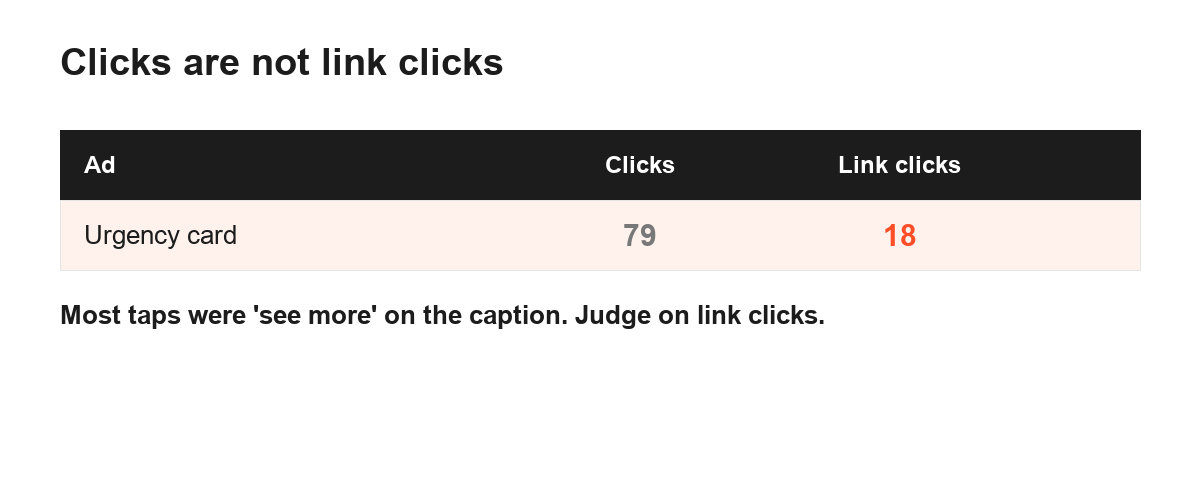
Facebook counts a tap on the see more link of a long caption as a click. So does a tap that expands the post. In this ad, of 79 clicks, only 18 were genuine link clicks that could lead to the form. The rest were people opening the caption and moving on. The headline click-through rate was a mirage, and we had nearly scaled an ad that was going nowhere.
The fix was not to change the ad. It was to change what we measured. From that point we judged every ad on link clicks only, never on all clicks, and the mirage disappeared. If your ads look busy but the leads are thin, this is the first place to check. Pull the link click number out on its own and compare it to the total. If there is a big gap, your click-through rate has been lying to you. We explain how this feeds into real cost per lead in the cost post.
The dead pixel after a site move
The second fault was worse, because it hid in a place we trusted. We moved part of our site, and the tracking pixel quietly stopped firing on the pages that mattered. The ads kept running. The budget kept spending. But the data coming back was wrong, and for a while we were making decisions on numbers that no longer reflected reality.
This is the danger with tracking. When it breaks, nothing flashes red. The ads do not stop, the account does not warn you, and the charts still draw themselves. They just draw the wrong picture. We only caught it because a count that should have been climbing had gone flat, and flat where you expect movement is a signal worth chasing. When we checked the pixel, it was not firing where it should.
The lesson we took is to treat tracking as something you verify on a schedule, not something you set up once and forget. After any change to your site, however small it feels, confirm that the pixel still fires on the pages that count, especially the thank-you or confirmation page that marks a real lead. A broken pixel does not just lose you data. It teaches the ad system the wrong lesson, so it optimises toward the wrong people, and the damage compounds every day it runs unseen.
The verification wall that cost us leads
The third fault we built on purpose, for a good reason, and it still hurt. We added phone verification to the lead flow to raise quality. The intent was sound: a verified number is a better lead than an unverified one. But verification is a wall, and every wall loses you people.
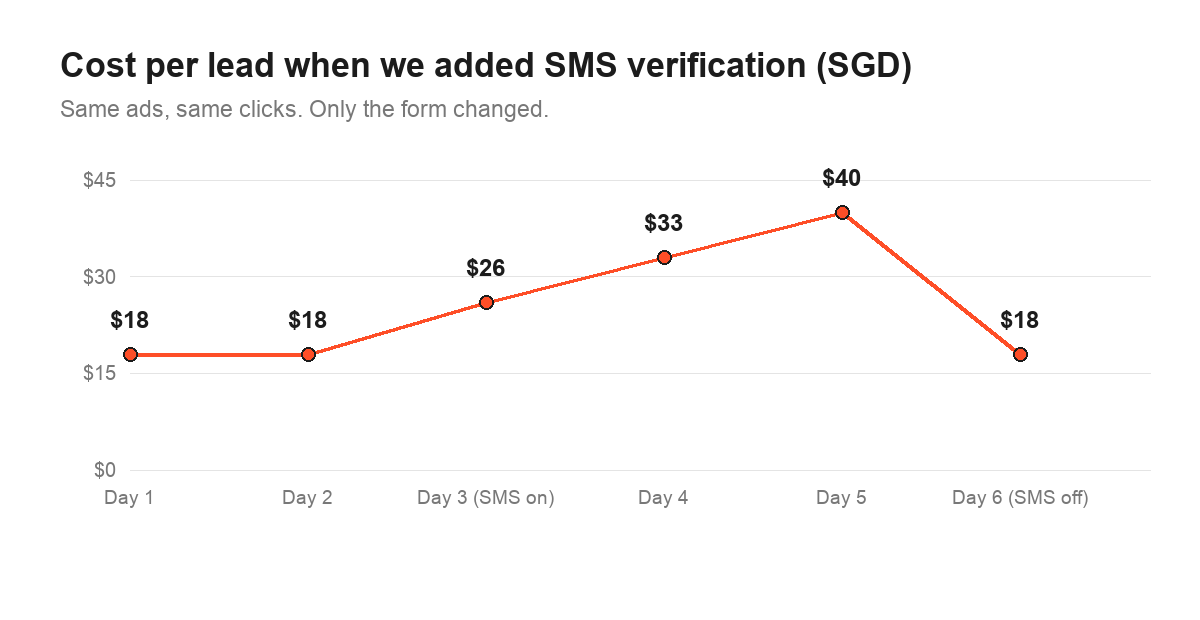
When the verification step went live, the share of people who finished the form dropped, and because we were paying the same for the clicks, our cost per lead rose. The ads had not changed at all. The plumbing had. For a while the numbers looked like an ad problem, and we nearly went hunting in the creative for a fault that was not there.
We are not saying never verify. A verified lead can be worth the loss if it saves your team time chasing numbers that do not connect. The point is that verification is a trade, not a free upgrade, and you have to measure both sides of it. Watch the completion rate, not just the lead count, and decide whether the cleaner leads are worth the ones you turned away at the wall. Above all, add it as its own change, on its own week, so you can actually see what it did. Which brings us to the most expensive mistake of all.
The learning reset we caused ourselves
On a single day, we did three things at once. We renamed our offer across every ad as the grant changed, we launched a new lead form, and we switched on the phone verification above. Three changes, one day, every ad touched. The result was that the system’s learning reset across the whole account at the same time, and for the better part of two weeks we could not tell what was working and what was not.
A learning reset is not a bug. When you make a significant edit to a live ad, the system has to relearn who to show it to, and performance wobbles while it does. One reset on one ad is manageable. We triggered it everywhere at once, and on top of that we had changed so many things that even once the dust settled, we could not attribute the result to any single cause. We had spent two weeks of budget and learnt almost nothing, which is the worst possible outcome of a test.
The fix is the same rule that runs through everything we do: change one thing at a time, and give it room. If we had renamed the offer on one week, changed the form the next, and added verification the week after, each wobble would have been small, readable and clearly owned by one change. Because we stacked them, we got one big wobble and no answers. When you have to touch a live account, treat each change as its own test, make it on a quiet week, and leave everything else alone until the system has settled. The method for doing that cleanly is in our testing guide.
Our rules for cutting an ad
Hidden faults are one half of plumbing. The other half is knowing when an ad is simply not working and should be cut, as opposed to one you have broken by accident. We got tidier about this as the project went on.
Our working rule was to give an ad complete days and enough link clicks to read, then act on sustained drift rather than one bad afternoon. In practice that meant cutting an ad that ran under about 0.8% link click-through with a cost over $25 in its first few days, before it drained budget we could spend on something better. We read link click-through in the first one to three days, conversion once an arm reached roughly 50 link clicks, and cost per lead at 15 to 20 leads. We never compared half days, because a morning and an evening behave differently and a part-day comparison fools you.
The discipline that matters most here is patience paired with decisiveness. Patience to let complete days play out before you judge, because an ad can have a slow morning and a strong night. Decisiveness to cut once the drift is clear, because a weak ad does not heal, it just spends. The cheapest thing we did in the whole project was kill losers early, and the second cheapest was resisting the urge to kill a winner during a normal wobble. Knowing the difference is most of the job.
A plumbing checklist before you blame the ad
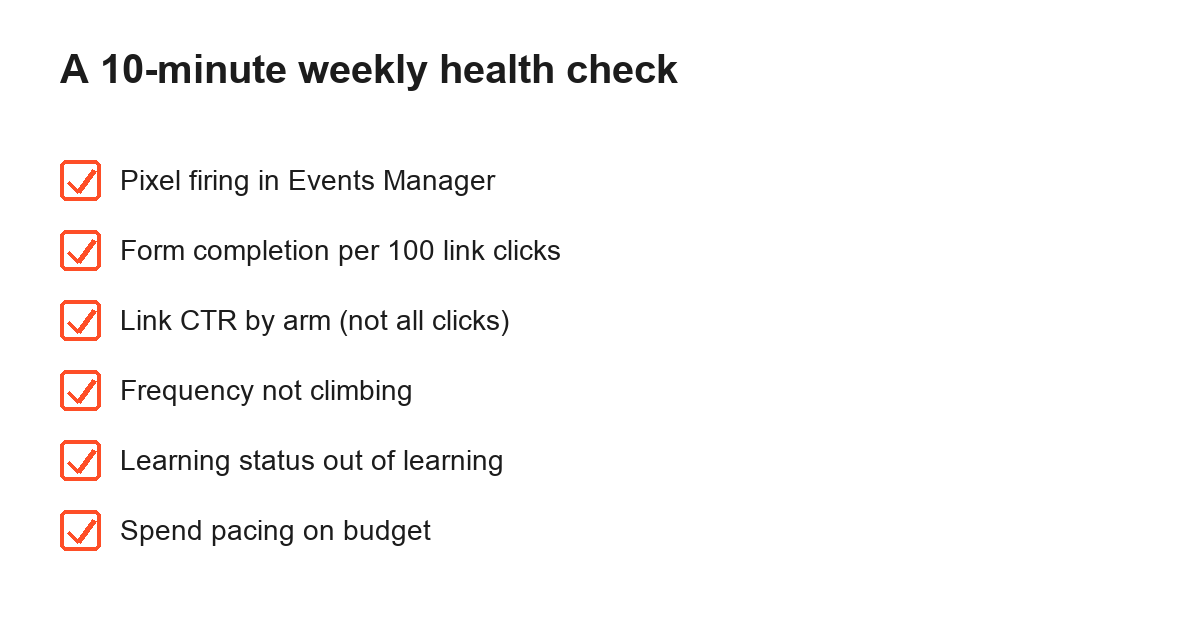
When a lead ad goes wrong, run through the machinery before you touch the creative. In order:
- Check link clicks against total clicks. A big gap means your click-through rate is hiding see more taps.
- Confirm the pixel still fires on the pages that mark a real lead, especially after any site change.
- Look for anything new between the click and the submit, such as a verification step or a longer form.
- Ask whether you recently made a significant edit that could have reset the ad’s learning.
- Give the ad complete days and enough clicks before you judge it at all.
- Only once the plumbing is clean, go and look at the words and the offer.
Almost every time our ads looked broken, the fault was somewhere on that list, not in the creative. The ad was fine. The pipe behind it had a hole. Checking the pipe first will save you from rewriting a perfectly good ad to fix a problem it never had.
Why none of this showed up as an error
The thread running through all three faults is that none of them announced itself. A dead pixel does not stop the ads. A verification wall does not throw a warning. A learning reset looks exactly like a run of bad luck. The account kept spending, the charts kept drawing, and every surface we looked at said things were fine. That is what makes plumbing faults so expensive: they cost you money and data for days before you even suspect them, and the longer they run, the more they teach the system the wrong thing.
So the real habit to build is suspicion of good-looking numbers, not just bad ones. The urgency ad that cost us nearly scaled because its click-through looked great. The dead pixel hid because the charts still drew. If a number looks surprisingly good, or a trend goes flat where you expected it to move, treat that as a reason to check the machinery, not a reason to celebrate. We learnt to trust a result only after we had confirmed the pipe behind it was sound. It is slower, and it is the only way we stopped getting fooled.
One honest note to close on
Clean plumbing does not make a weak offer work. It just means that when your offer is good, the leads actually reach you and the data you use to improve is true. And a lead, however cleanly it arrives, is still not a customer. The work that turns it into one happens after the form, in how fast you follow up and whether you get the person onto a call. Fix the pipes so the right leads come through and the numbers tell the truth, then put your real effort into what you do with them. A cheaper, cleaner lead that you ignore for a day is worth less than a dearer one you call in ten minutes.
Frequently asked questions
Why are my Facebook lead ads getting clicks but no leads?
Often the clicks are not what you think. Facebook counts a tap on the caption’s see more link as a click, so a high click count can hide very few real link clicks. In one of our ads only 18 of 79 clicks were genuine link clicks. Always read link clicks, not all clicks, before you judge an ad.
Why did my cost per lead suddenly jump?
The three usual suspects are a tracking break, a friction change in your form, and a learning reset from editing a live ad. We hit all three. Check that your pixel still fires, that nothing new stands between the click and the form, and that you have not just reset the ad with an edit.
Does editing a live Facebook ad reset its learning?
A significant edit can. We renamed our offer, changed the form and switched on verification on the same day, and the learning reset across every ad at once. If you must make a big change, make one at a time on a quiet week so you can still read what is happening.
Should I add phone verification to my lead form?
Be careful. When we added phone verification, fewer people finished the form, so our cost per lead rose even though the ads were unchanged. Verification can raise lead quality, but it adds friction, so test it as its own change and watch the completion rate, not just the lead count.
How do I know when to cut a Facebook ad?
Give it complete days and enough clicks to read, then cut on sustained drift, not one bad afternoon. Our rule was to cut an ad running under about 0.8% link click-through with a cost over $25 in the first few days, before it drained the budget.
Want a second pair of eyes on your ads? Get a free EDGE quote and we will look at your paid social, your tracking and your form, and tell you what support you may qualify for. For the grant terms themselves, read the official Enterprise Singapore EDGE page.